
I ran one command on my Mac to count the Claude Code conversations older than 30 days:
find ~/.claude/projects -maxdepth 2 -name '*.jsonl' -mtime +30 | wc -lIt printed 64. The oldest was from August 10, more than three months old on the day I ran it, November 15, 2026.
None of those should still be there. Claude Code deletes any transcript older than cleanupPeriodDays, 30 days by default, in a background sweep with no message. All 64 had come from the Claude Desktop app, and the docs give that app its own rule.
TLDR
Claude Code saves each conversation as a JSONL file in ~/.claude/projects and deletes it after 30 days, unless the session came from Claude Desktop or Cowork. /export writes plain text, so convert the JSONL file with jq when you want a Markdown copy.
Where Claude Code keeps your conversations
Everything lives under ~/.claude, a hidden folder in your home directory. Conversations are in ~/.claude/projects, with one folder per project and one file per conversation.
The folder name is your project’s path with every character other than letters and digits replaced by a hyphen. A project at /Users/me/code/demo-app gets a folder called -Users-me-code-demo-app. Dots count too: on my Mac, a project in ~/.config/rex sits in -Users-me--config-rex, with two hyphens in a row.
Inside, each conversation is a .jsonl file named by its session ID. To see the newest ones for a project first:
ls -lt ~/.claude/projects/-Users-me-code-demo-app
The .claude directory docs list what else sits next to a transcript. Subagent conversations go in a subagents folder under the session, and large tool outputs are spilled into tool-results. Subagent transcripts are removed with the parent when it ages out.
There’s also ~/.claude/history.jsonl. That one holds only the prompts you typed, with a timestamp and the project path. It powers the up arrow and Ctrl+R search, and the usual 30-day sweep leaves it alone.
If you set CLAUDE_CONFIG_DIR, all of this moves under that folder instead.
A JSONL file is one JSON object per line, built for tools, not for you. It’s also big. I started Claude Code (version 2.1.319) in an empty test folder and asked for a three-item Markdown checklist on renaming a git branch. One prompt, a five-line answer, and a 543,550-byte transcript.
The docs explain the gap: a transcript can also hold the system prompt, tool definitions, request parameters and the instruction files Claude Code loaded, like CLAUDE.md.
Why old conversations disappear, and why 64 didn’t
Claude Code cleans up automatically. Transcripts older than cleanupPeriodDays get deleted, along with their subagent and tool-result folders. The settings reference gives the default as 30 days and the minimum as 1. Setting it to 0 fails validation.
The same page says the sweep runs in the background after a session starts. A session you haven’t touched for longer than that won’t show up in /resume anymore.
So why did 64 transcripts outlive the sweep? Each JSONL line records where the session came from, in a field called entrypoint. I checked the last one in every file older than 30 days:
grep -o '"entrypoint":"[^"]*"' session.jsonl | tail -1All 64 said "entrypoint":"claude-desktop".
The docs cover it in one line: Claude Code keeps the transcript of a session you started or most recently continued in Claude Desktop or Cowork at any age. To give those an age limit, set desktopSessionCleanupPeriodDays in your user settings. That needs Claude Code 2.1.248 or later.
One catch with that setting. A transcript goes only once it’s older than both limits. With cleanupPeriodDays at 30, a desktop limit of 7 still keeps them 30 days.
Keep conversations longer
To keep transcripts longer, raise cleanupPeriodDays in ~/.claude/settings.json:
{
  "cleanupPeriodDays": 90
}
Before you set it to a year, think about what’s in these files. The docs are plain about it: transcripts aren’t encrypted at rest. Anything that passed through a tool is written to disk, including file contents, command output and pasted text. If a tool read a .env file, that secret is in the transcript.
A longer period means those copies sit on your Mac longer. Going the other way, CLAUDE_CODE_SKIP_PROMPT_HISTORY stops Claude Code from writing transcripts and prompt history at all. For one-off scripts, claude -p --no-session-persistence does the same for that run.
To wipe one project’s history on purpose, claude purge deletes its transcripts, auto memory and matching history lines. Run it with --dry-run first. It prints the plan and deletes nothing.
What I do: leave the sweep at 30 days. When a conversation is worth keeping, convert it to Markdown with the jq script below and save it in the project, in a folder like docs/sessions.
Find and resume a past conversation
You don’t need the files to go back to a conversation. Claude Code has three ways in, all in the CLI reference:
claude -ccontinues the most recent conversation in the current folder. It skips sessions created withclaude -por the Agent SDK.claude -rwith a session ID or name resumes a specific one. With no ID, it opens a picker./resumeinside a session opens the same picker.
Name a session with /rename while you’re in it, and you can come back later with claude -r "auth-refactor" instead of hunting for an ID. You can also pass the absolute path to a .jsonl file in place of the ID.
/export gives you plain text, not Markdown
If you use Codex too, its /export writes Markdown, which I covered in where Codex keeps its plans and sessions. Claude Code’s doesn’t. Its command reference says /export exports the current conversation as plain text. With a file name, it writes straight to that file. Without one, it asks whether to copy or save.
I tried it on the branch-rename test. I resumed the session and typed /export conversation.md. Claude Code printed “Conversation exported to:” and the path. The file was 858 bytes, and the answer looked like this:
⏺ Rename a git branch

  - [ ] Rename the local branch: git branch -m old-name new-name
  - [ ] Push the renamed branch and set its upstream: git push -u origin
    new-name
It’s a copy of what the terminal showed. The ## on the heading is gone, replaced by the bullet symbol Claude Code draws on screen. The backticks around every command are gone. Lines wrap at about 80 characters, in the middle of list items. The file also opens with the welcome box from the top of the terminal, version number and all.
/export is interactive only. In print mode, claude -p -r <session> "/export notes.md" answers “/export isn’t available in this environment.”
Turn a transcript into real Markdown
The transcript stores Claude’s answers as the original Markdown, headings and backticks included. So I wrote a small jq script that pulls out what you typed and what Claude answered, and skips everything else.
Save this as transcript-to-md.jq:
if .type == "user" and (.message.content | type) == "string" and (.message.content | startswith("<") | not) then
  "## You\n\n" + .message.content + "\n"
elif .type == "assistant" then
  ([.message.content[]? | select(.type == "text") | .text] | join("\n\n")) as $t
  | if $t == "" then empty else "## Claude\n\n" + $t + "\n" end
else empty end
Then run it on a session file:
jq -r -f transcript-to-md.jq ~/.claude/projects/-Users-me-code-demo-app/<session-id>.jsonl > session.mdOn my Mac, jq was already in /usr/bin (jq-1.7.1-apple, macOS 27.2.1), so nothing needed installing. The 543,550-byte test transcript became a 536-byte session.md. Claude’s checklist came through as it wrote it: a ## heading, - [ ] items, and every git command in backticks.
I also ran it on five recent real sessions to make sure longer ones didn’t break it. They came out at 8 to 848 lines each, with no errors.
It skips three things:
- Tool calls and their output, like file edits and command results.
- Slash commands and their replies, which are stored as lines that start with
<. - Images and pasted attachments.
If you need the tool calls, read the JSONL directly.
The docs cover where transcripts live and what they hold, but not the line format. I read the format from real files, so if an update renames a field, the script breaks and needs a small fix.
Read the Markdown, not the JSONL
Once you have session.md, you need somewhere decent to read it. A text editor shows you the raw Markdown, which is readable but slow.
If you use dotPen and save converted sessions into a folder inside your project, like docs/sessions, dotPen picks them up with the rest of the project’s Markdown and renders them, checklists and code included. If that folder is in .gitignore, turn on Show ignored paths in Settings, since dotPen hides ignored paths by default.
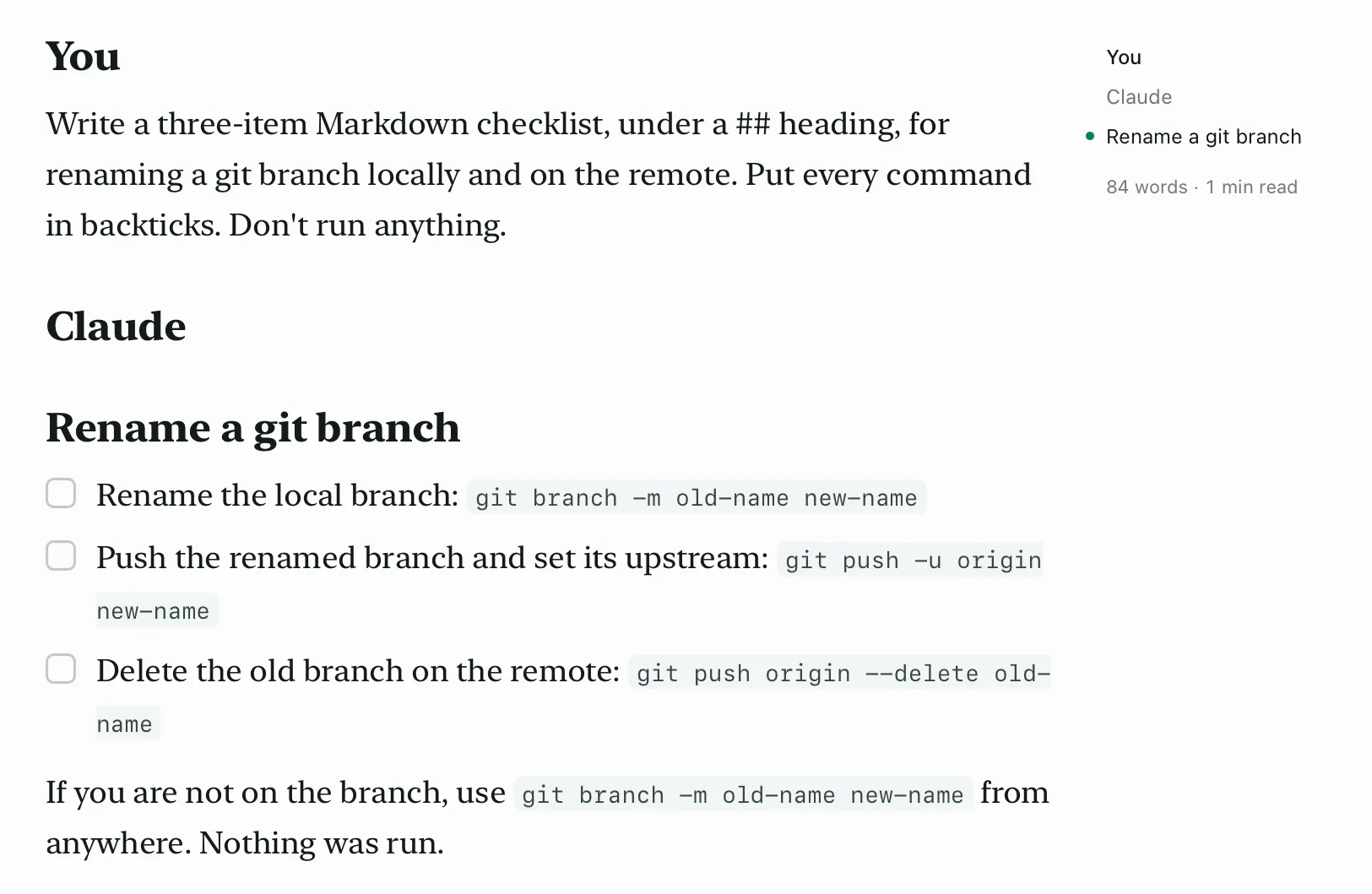
The last thing I ran was the same find command with -mtime +25. It listed 148 more transcripts between 26 and 30 days old, and none of them came from the desktop app. All 148 go in the next few days. Run it on your Mac before you close Terminal, and convert the ones you want to keep.
Questions
- Where does Claude Code store conversation history?
- In ~/.claude/projects. Each project gets a folder named after its path, with every character other than letters and digits turned into a hyphen. Each conversation is one .jsonl file in that folder, named by its session ID.
- Does Claude Code delete old conversations?
- Yes. Claude Code deletes transcripts older than cleanupPeriodDays, which is 30 days by default. Sessions you started or most recently continued in Claude Desktop or Cowork are kept at any age, unless you set desktopSessionCleanupPeriodDays.
- How do I export a Claude Code conversation to Markdown?
- Type /export with a file name in an interactive session, like /export notes.md. The file is plain text, though, so headings and code formatting are lost. To get real Markdown, convert the session's .jsonl file with a short jq script.
- How do I resume a previous Claude Code session?
- Run claude -c to continue the most recent conversation in the current folder, or claude -r with a session ID or name to pick a specific one. Inside a session, /resume opens the session picker.
- Are Claude Code transcripts encrypted?
- No. Transcripts and prompt history are plain text on disk, protected only by your Mac's file permissions. Anything a tool read or printed, including a secret from a .env file, can end up in a transcript.