
To see what Claude Code saves when you tell it to remember something, I made a new git repo called recipe-site, with a package.json and no lockfile, and gave Claude Code one sentence:
claude -p "Remember that this project uses pnpm, not npm."It answered in about 37 seconds: “Saved. Future sessions in this folder will use pnpm for every package operation and never npm or npx.”
Then I looked in the repo. No CLAUDE.md. No new file. Whatever Claude Code had saved, it wasn’t in the project.
It was in my home folder, and one ls showed it. I ran four more tests on the same Mac on November 11, 2026, all with claude -p, Claude Code’s one-prompt mode, on version 2.1.319.
TLDR
Claude Code saves auto memory as Markdown files in
~/.claude/projects/<project>/memory, outside your repo. AMEMORY.mdindex loads each session, and topic files load when needed. Memory follows the git repo, skips the 30-day cleanup, and stays on one Mac.
Where Claude Code stores memory
Auto memory lives in your home folder, in the hidden .claude folder. The memory docs give the path as ~/.claude/projects/<project>/memory/.
<project> comes from your repo’s full path, with every slash turned into a hyphen, so the folder name gets long. You don’t have to type it. This finds it by the repo’s name:
ls ~/.claude/projects/*recipe-site/memoryOn my Mac, that printed two files:
MEMORY.md
recipe-site-uses-pnpm.md
MEMORY.md is the index. recipe-site-uses-pnpm.md is the memory itself, and Claude picked that file name on its own.
The same projects folder also holds your conversation transcripts, one .jsonl file per session. Those get deleted after 30 days, and the memory folder doesn’t. I wrote about the transcripts in where Claude Code stores your conversation history.
What’s inside a memory file
Both files are plain Markdown. MEMORY.md had a single line: a link to the topic file, followed by a short note to run pnpm, never npm or npx.
The topic file opens with front matter:
---
name: recipe-site-uses-pnpm
description: "The recipe-site project uses pnpm as its package manager, never npm"
metadata:
  node_type: memory
  type: project
  originSessionId: 9b0e0516-d1d5-4155-8b39-09f7d7482f8c
  modified: 2026-11-11T05:04:39.277Z
---
Under that, the body had two short lines. A Why: line said the user had stated it and that the repo had no lockfile yet. A How to apply: line said to run pnpm install, pnpm add and pnpm run, and never npm or npx.
The type field is one of four kinds the docs list:
- user: your role, expertise and how you like to work.
- feedback: corrections you give and approaches you confirm.
- project: ongoing work, deadlines and decisions that the code doesn’t show.
- reference: where to find things outside the project, like an issue tracker.
The modified time comes from Claude Code, not from Claude. The docs say Claude Code records it whenever Claude writes a memory file that starts with front matter, so both of you can tell how fresh a fact is. Mine says 05:04 UTC, the minute the test ran.
Claude also doesn’t save everything. The docs say it skips anything it could work out from the code, like file paths or architecture, and anything your CLAUDE.md already says. It also decides on its own whether a session had anything worth keeping. Saying “remember” is the direct way to get a memory written, and every test here used it.
A subfolder gets its own transcripts, but not its own memory
Next I started a fresh session from recipe-site/src and asked: “What command should I run to add the zod package here? Reply with the command only.”
The answer took 6 seconds:
pnpm add zodSo the new session knew about pnpm. It had also made a second folder in ~/.claude/projects:
ls -d ~/.claude/projects/*recipe-site*/Users/me/.claude/projects/-Users-me-Documents-claude-work-blog-tests-2026-11-11-claude-code-memory-recipe-site
/Users/me/.claude/projects/-Users-me-Documents-claude-work-blog-tests-2026-11-11-claude-code-memory-recipe-site-srcInside the -src folder there was one .jsonl transcript, and nothing else. The memory stayed with the repo root.
That matches the docs: the memory folder’s name comes from the git repo, so all subfolders and worktrees of one repo share it. Transcripts go by the folder you started in. If you see three folders for one repo in ~/.claude/projects, only one of them holds the memory. Outside a git repo, the project root is used instead.
When Claude changes a memory
Back in recipe-site, I sent: “We switched this project from pnpm to bun. Remember that.”
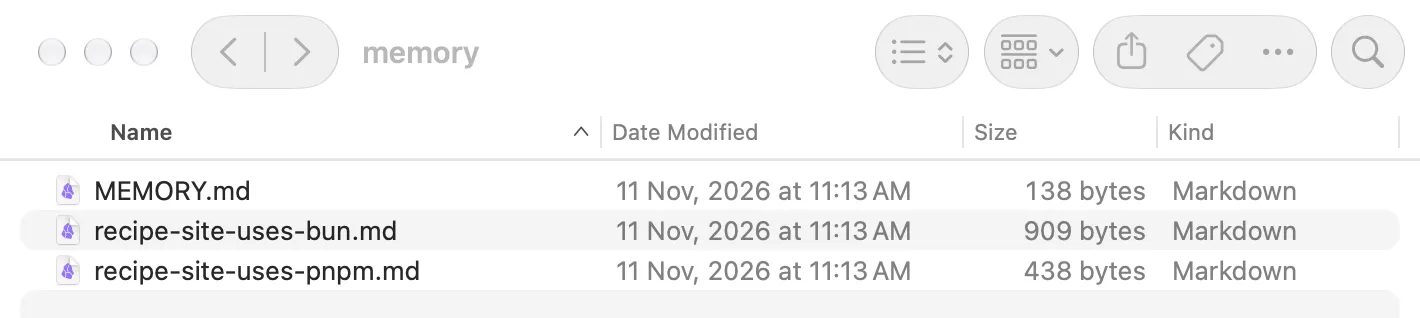
Forty seconds later, three files in the memory folder had changed:
MEMORY.mdnow pointed to a new file,recipe-site-uses-bun.md, with a note that the project switched from pnpm that day.recipe-site-uses-bun.mdwas new, with its own front matter and the same Why: and How to apply: lines, now for bun.recipe-site-uses-pnpm.mdkept its name, but its description now starts with “Superseded on 2026-11-11” and points to the bun file. Its body says not to run pnpm in this project.
What Claude Code loads at the start of a session
The docs say only the first 200 lines of MEMORY.md, or the first 25KB, whichever comes first, load at the start of every conversation. Anything past that doesn’t load.
Topic files don’t load at startup at all. Claude reads them with its file tools when a task needs them. That’s why MEMORY.md is a list of one-line links and not the memories themselves.
Two more rules from the docs:
- When
MEMORY.mdgets near the limit, Claude Code reminds Claude to shorten it: one line per entry, details moved into topic files, stale entries merged or dropped. - Subagents don’t get your main conversation’s memory. A fork does, because it inherits the parent conversation.
Does Claude Code delete memory?
No. Claude Code deletes old transcripts after cleanupPeriodDays, 30 days by default, but the cleanup rules say the sweep doesn’t delete the files in a memory folder. It only removes the folder if it has sat empty for the whole retention period. A memory from six months ago still loads today, even if the project moved on.
Memory also stays on one Mac. The docs say it’s machine-local and isn’t shared across machines or cloud environments. Work on the same repo from two Macs, and each one builds its own memory.
What “remember” did with memory turned off
CLAUDE_CODE_DISABLE_AUTO_MEMORY=1 claude -p "Remember that this project uses pnpm, not npm."I sent that in another new repo, off-test, with auto memory switched off by the environment variable. Claude answered: “Saved. I wrote the pnpm rule into a new CLAUDE.md in this folder, so every future session here loads it automatically.”
And it had. There was a new CLAUDE.md in the repo:
# Project notes

- Package manager: pnpm, not npm. Use `pnpm install`, `pnpm add`, `pnpm run`.
The ~/.claude/projects folder for off-test held a transcript and no memory folder. In git status, the new CLAUDE.md showed up as untracked, where the next git add . would pick it up.
In this run, the note moved into the project. Claude chose the file itself, and the docs don’t say what “remember” does with memory off. If you turn memory off because you don’t want notes in your repo, check git status after the next “remember”.
There are three ways to switch auto memory off, per the docs:
- Everywhere: open
/memoryin a session and use the auto memory toggle. It savesautoMemoryEnabledto~/.claude/settings.json. - One project: add this to that project’s settings:
{
  "autoMemoryEnabled": false
}- One run: set
CLAUDE_CODE_DISABLE_AUTO_MEMORY=1, like the test above.
One catch from the docs: in a background session, or a session another Claude Code session started, the toggle can turn memory off but not back on. Run claude directly in Terminal to turn it on again.
Move memory to a folder you choose
The autoMemoryDirectory setting puts memory where you want it. The settings reference says it takes an absolute path or one that starts with ~/, and Claude Code reads it from any settings file.
I tested it in a third repo, dir-test, by passing a folder next to it with --settings:
claude -p "Remember that this project uses pnpm, not npm." --settings '{"autoMemoryDirectory":"~/Documents/claude-work/blog-tests/2026-11-11-claude-code-memory/dir-test-memory"}'Afterward, dir-test-memory had a MEMORY.md and a dir-test-uses-pnpm.md in it. The ~/.claude/projects folder for dir-test had just a transcript.
The docs add a rule for repos: when a project’s own settings set this path, Claude Code honors it under the same folder trust rule as hooks, since anyone can put that file in a repo they share.
Memory or CLAUDE.md?
The docs are clear about the default. “Remember” goes to auto memory. “Add this to CLAUDE.md” goes to CLAUDE.md.
CLAUDE.md sits in the repo, loads whole in every session, and reaches anyone who clones the project. Auto memory sits in your home folder and reaches only you, on that one Mac.
What I do: a rule the whole team needs, like the package manager, goes in CLAUDE.md on purpose and gets committed. Notes about how you like to work stay in memory. When a memory turns out to matter for everyone, move it into CLAUDE.md yourself, so it doesn’t live on one laptop.
Read your memory files
The quickest way in is /memory. It lists your CLAUDE.md files, has the auto memory toggle, and has an option to open the memory folder. Pick a file to open it in your editor.
That shows a file as it is now, not what changed. After the bun test, the pnpm file opened as the superseded note, with nothing left of the version from nine minutes earlier.
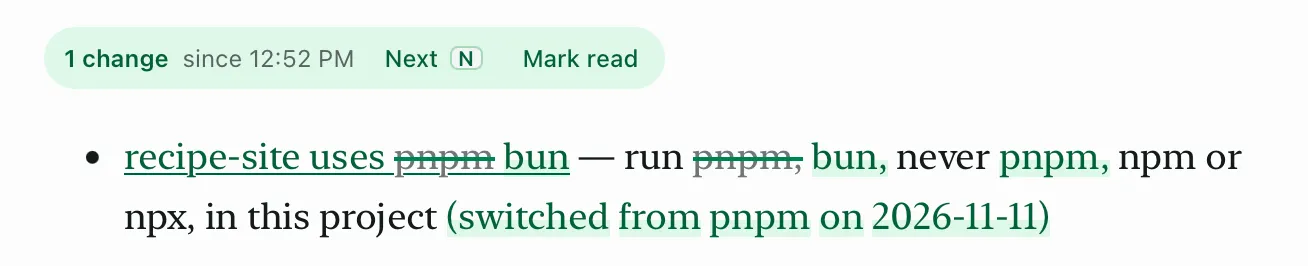
dotPen, the Markdown reader we build for agent files, can watch the memory folder like any other. Go to Settings, then Folders, and press Command-Shift-Period in the folder picker to show the hidden .claude folder. dotPen keeps a copy of each file as you last read it, so after Claude rewrites a memory, the next time you open it the old words are struck through and the new ones are in green. More in how to review what an AI agent changed, without git.
Plan mode keeps its files in a different hidden folder, with its own cleanup. That’s in how to read Claude Code plans on a Mac.
To see what Claude Code already keeps about one of your repos, run the ls command from the top with your repo’s name. The docs say these are plain Markdown files you can edit or delete at any time, so if a memory is wrong or out of date, fix the file.
Deleting a repo doesn’t delete its memory, because the memory folder isn’t in the project. To clear one project on purpose, claude purge removes its transcripts and auto memory together. Run it with --dry-run first, and it prints what it would delete without deleting anything.
Questions
- Where does Claude Code store memory?
- Auto memory lives in ~/.claude/projects/<project>/memory on your Mac. The folder holds a MEMORY.md index and one Markdown file per memory. The <project> name comes from the git repo, so every subfolder and worktree of a repo shares one memory folder.
- What is the difference between CLAUDE.md and Claude Code memory?
- You write CLAUDE.md, it usually lives in your project, and the whole file loads in every session. Claude writes auto memory, it lives in your home folder under ~/.claude/projects, and only the first 200 lines or 25KB of its MEMORY.md index load at the start of a session.
- How do I turn off Claude Code auto memory?
- Open /memory in a session and use the auto memory toggle, which saves autoMemoryEnabled to ~/.claude/settings.json. For one project, set "autoMemoryEnabled" to false in that project's settings. For a single run, set the environment variable CLAUDE_CODE_DISABLE_AUTO_MEMORY=1.
- Does Claude Code delete old memories?
- No. The 30-day sweep that deletes old transcripts doesn't delete the memory files. MEMORY.md and the topic files stay until you or Claude edit or delete them.
- Can I change where Claude Code saves memory?
- Yes. Set autoMemoryDirectory in your settings to an absolute path or a path that starts with ~/. Claude Code reads it from any settings file, including one passed with the --settings flag.
- Is Claude Code memory shared between my Macs?
- No. The docs say auto memory is machine-local. Files aren't shared across machines or cloud environments, so a second Mac starts with an empty memory folder for the same repo.