Plans, specs, handoffs: the Markdown files your coding agent writes
I counted the Markdown files in one of our repos after a month with coding agents, and most of them were written by agents. What each kind is for, which ones you should read, and where they live.

A month after our team started using coding agents every day, I counted the Markdown files in one of our repos. Before agents, there was a README, a CHANGELOG and a few docs nobody updated. Now there were plans, specs, handoff notes, instruction files for three different agents, and a folder of rules I didn’t know existed.
Most of them were written by agents. Some of them were written for agents. And I couldn’t tell at a glance which was which, or which ones I was supposed to read.
So I sorted them out. This is the map I wish I’d had on day one.
TLDR
Coding agents work with two kinds of Markdown files. Instruction files tell the agent how to behave: CLAUDE.md for Claude Code, AGENTS.md for Codex, Cursor and many others, and .mdc rules in .cursor/rules for Cursor. Working files are what the agent writes as it goes: plans, specs, design docs and handoff notes. You write the first kind once. You should read the second kind every time, before the code exists.
Files agents read: instructions
These are the files you write for the agent. They hold the rules for your project: how to run the tests, which folders not to touch, the style you want.
CLAUDE.md: Claude Code’s instruction file. According to the Claude Code memory docs, it can live in a few places:
./CLAUDE.mdor./.claude/CLAUDE.mdin your project, shared with the team.~/.claude/CLAUDE.mdfor your own rules across every project../CLAUDE.local.mdfor personal notes on one project, which you add to.gitignore.
AGENTS.md: an open format that the agents.md site calls “a README for agents”. Codex, Cursor, Gemini CLI, GitHub Copilot’s coding agent and many other tools read it. Claude Code reads it too, but by default only when there’s no CLAUDE.md. If you have both, add @AGENTS.md to your CLAUDE.md and Claude Code pulls it in.
Cursor rules: Cursor keeps project rules in .cursor/rules, as .mdc files. Each one can start with a short header saying when it applies:
---
description: How we write database migrations
globs: db/migrations/**
alwaysApply: false
---

Every migration needs a down step...
Cursor’s docs say plain .md files in that folder are ignored, and that a .cursorrules file in the project root is the legacy format.
You’ll also see GEMINI.md for Gemini CLI and copilot-instructions.md for GitHub Copilot. Same idea, different agent.
What I do: one AGENTS.md with the rules every agent should follow, and a short CLAUDE.md that imports it and adds anything Claude-specific. One source of truth, and no agent misses a rule because it reads a different file.
Files agents write: working documents
These are the files that pile up. No standard says what to call them, but the same few kinds show up in every repo I’ve seen.
Plans: a step-by-step list of what the agent is about to do, usually with task boxes. Claude Code’s plan mode writes these to ~/.claude/plans by default and deletes them after 30 days. I covered how to keep them in how to read Claude Code plans on a Mac.
Specs and design docs: what a feature should do and how it should work, often with a Mermaid diagram and a table or two. Agents write these when you ask them to think before building. They usually live in docs/specs, docs/design or an rfcs or adr folder.
Handoff notes: a summary written at the end of a session, for the next session or the next person. What got done, what’s left, what broke. Names vary: HANDOFF.md, NOTES.md, docs/handoff/ with a date.
Changelogs and READMEs: the old familiar ones, now often updated by the agent as part of the task.
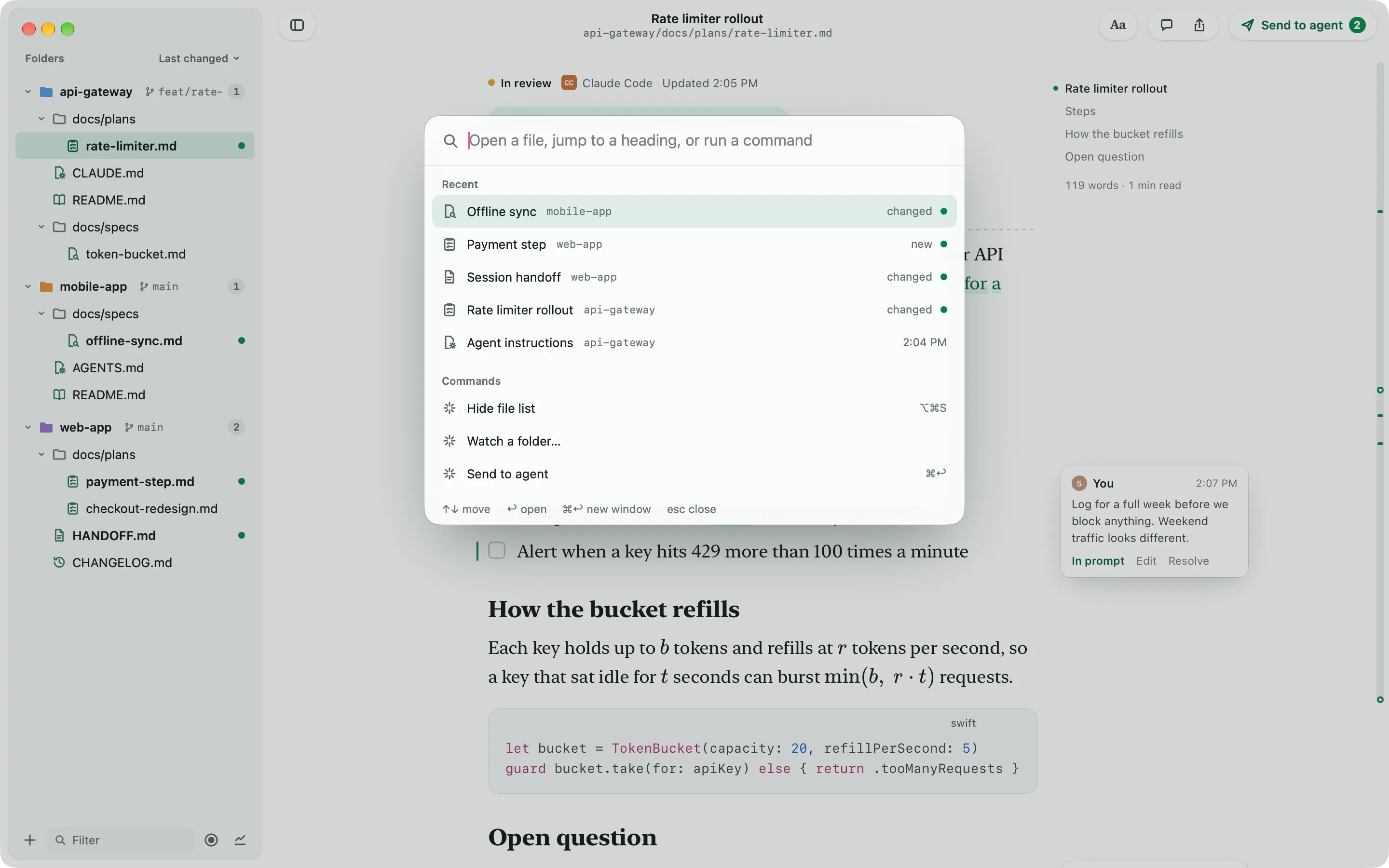
That’s one evening of agent work across three projects, in dotPen’s quick open: two plans, a spec, a handoff and an instruction file, most of them new or changed since I last read them.
Which ones you should actually read
Not all of them, every time. This is where I put my attention:
- Every plan, before you approve it. It’s the cheapest point to catch a wrong assumption. Once the code exists, the same fix costs ten times as much.
- Every spec that changes scope. If the agent decides the task is bigger than you asked, you want to know before it builds the bigger thing.
- Handoff notes, at the start of the next session. They tell you what the agent thinks is done. Check it against what you think is done.
- Instruction files, when they change. An agent editing its own CLAUDE.md or AGENTS.md is worth a look every time.
Changelogs and READMEs I skim when they change.
How I keep track of them
Reading all of these in a text editor gets old fast. They’re scattered across folders and repos, and nothing tells you which ones are new.
That’s the problem we built dotPen for, the Markdown reader for Claude Code, Codex and Cursor that runs on your Mac. On first launch it asks for your code folder and finds your projects by their CLAUDE.md, AGENTS.md or .cursor files. After that:
- Each file gets an icon for its kind, guessed from its name and folder. Files with “plan” in the name or a
plansfolder are plans. “spec”, “design”, “rfc” or “adr” mean specs. Instruction files and anything inside.claudeor.cursorget their own icon. - New and unread files get a dot, and a pencil shows while an agent is still writing one.
- When you open a file again, dotPen marks what changed since you last read it.
It reads Cursor’s .mdc rules files too, front matter and all. If you want to review those changes properly, I wrote up how to review what an AI agent changed, without git. The full list is on the features page.
Once you can tell the files apart, the pile stops being noise. The instruction files are yours to keep tidy. The working files are where the agent tells you what it’s thinking, and they’re worth reading.
Questions
- What is the difference between CLAUDE.md and AGENTS.md?
- CLAUDE.md is Claude Code's instruction file. AGENTS.md is an open format that many agents read, including Codex, Cursor and Gemini CLI. Claude Code reads AGENTS.md too, by default only when no CLAUDE.md exists, and you can import it from CLAUDE.md with @AGENTS.md.
- Where do Cursor rules go?
- In .cursor/rules, as .mdc files with optional description, globs and alwaysApply fields at the top. Cursor ignores plain .md files in that folder. A .cursorrules file in the project root is the legacy format.
- Where does Claude Code save its plans?
- In ~/.claude/plans by default, and it deletes files there after 30 days. The plansDirectory setting moves them into your project.
- Should I commit agent-written plans and specs?
- Instruction files, yes, so the whole team's agents follow the same rules. Plans and specs depend on your team. They're a useful record, but read them before committing, since they can include internal details.