
Ask a coding agent to design anything and there’s a good chance you’ll get a Mermaid diagram. A flowchart of the request path. A sequence diagram of the login. A state machine for an order.
In the file, every one of those is just text:
flowchart LR
  A[Request] --> B{Tokens left?}
  B -->|yes| C[Allow]
  B -->|no| D[429, retry later]
That’s fine if you can picture a flowchart from arrows and brackets. I can’t. The first time an agent handed me a spec with three of these, I read the prose and skipped the diagrams, which meant I skipped the part the agent thought was most important.
TLDR
A Mermaid diagram is a code block marked mermaid inside a Markdown file. It only becomes a picture in an app that renders Mermaid. On a Mac, GitHub, VS Code’s built-in Markdown preview, Obsidian and Markdown viewers like dotPen all render it, and dotPen works offline. If a diagram fails to draw, read the error first: it’s almost always a missing arrow, an unclosed bracket or a reserved word.
What a Mermaid diagram is
Mermaid lets you write diagrams as text. You type the boxes and arrows as lines of code, and a renderer draws them. In Markdown, a diagram lives in a fenced code block with mermaid after the opening backticks.
That’s why agents use it so much. A diagram that is just text can be written, diffed and edited by an agent like any other line in the file. No image editor, no exported PNG that goes stale.
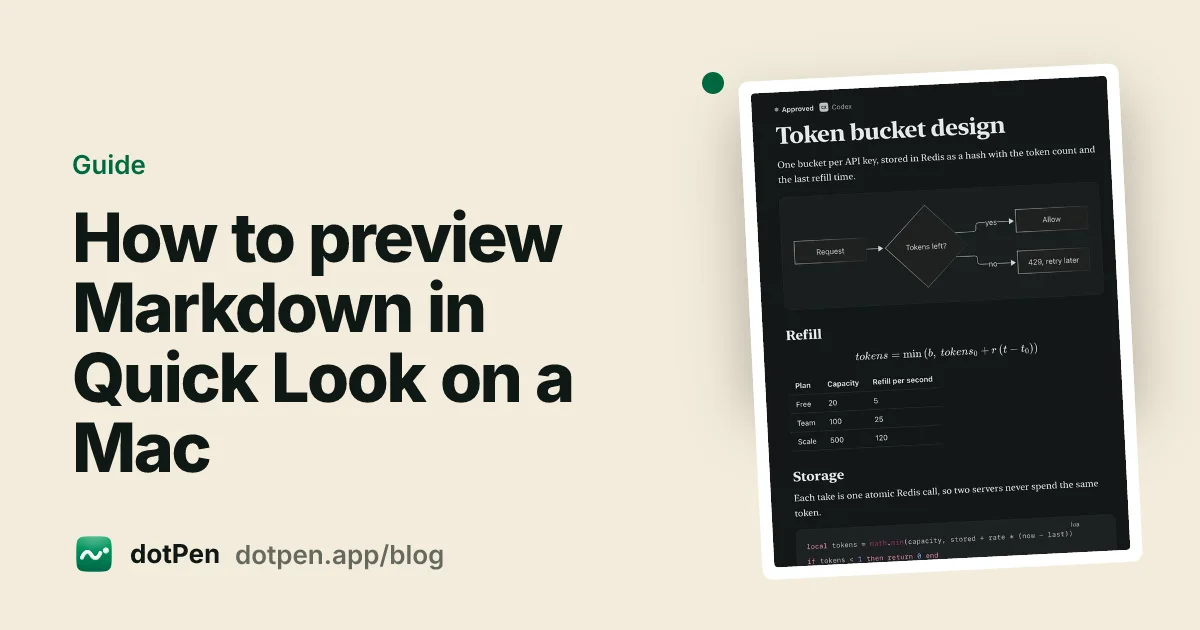
The block above draws four boxes. A request goes into a diamond asking “Tokens left?”, and two arrows come out: yes to Allow, no to “429, retry later”.
Ways to see Mermaid rendered on a Mac
You have more options than you might think. These are the ones I’d actually use.
GitHub: if the file is in a GitHub repository, open it there. GitHub’s docs say it renders Mermaid in Markdown files, issues, discussions, pull requests and wikis. It’s the easiest option when the file is already pushed.
VS Code: since version 1.121, VS Code’s built-in Markdown preview renders Mermaid without an extension. Open the file and press Shift-Command-V. You can pan and zoom the diagram in the preview.
Obsidian: if you keep notes in Obsidian, a mermaid code block renders there with no plugin.
Mermaid Live Editor: mermaid.live is the Mermaid project’s own web editor. Paste the code in and you see the diagram as you type. It’s the best place to fix a broken diagram, but it’s online, and you’re pasting your content into a website.
A Markdown viewer: this is what I use for agent files. dotPen, the free Markdown viewer for Mac we build, renders Mermaid inline as part of the page, along with tables, task lists, code and math.
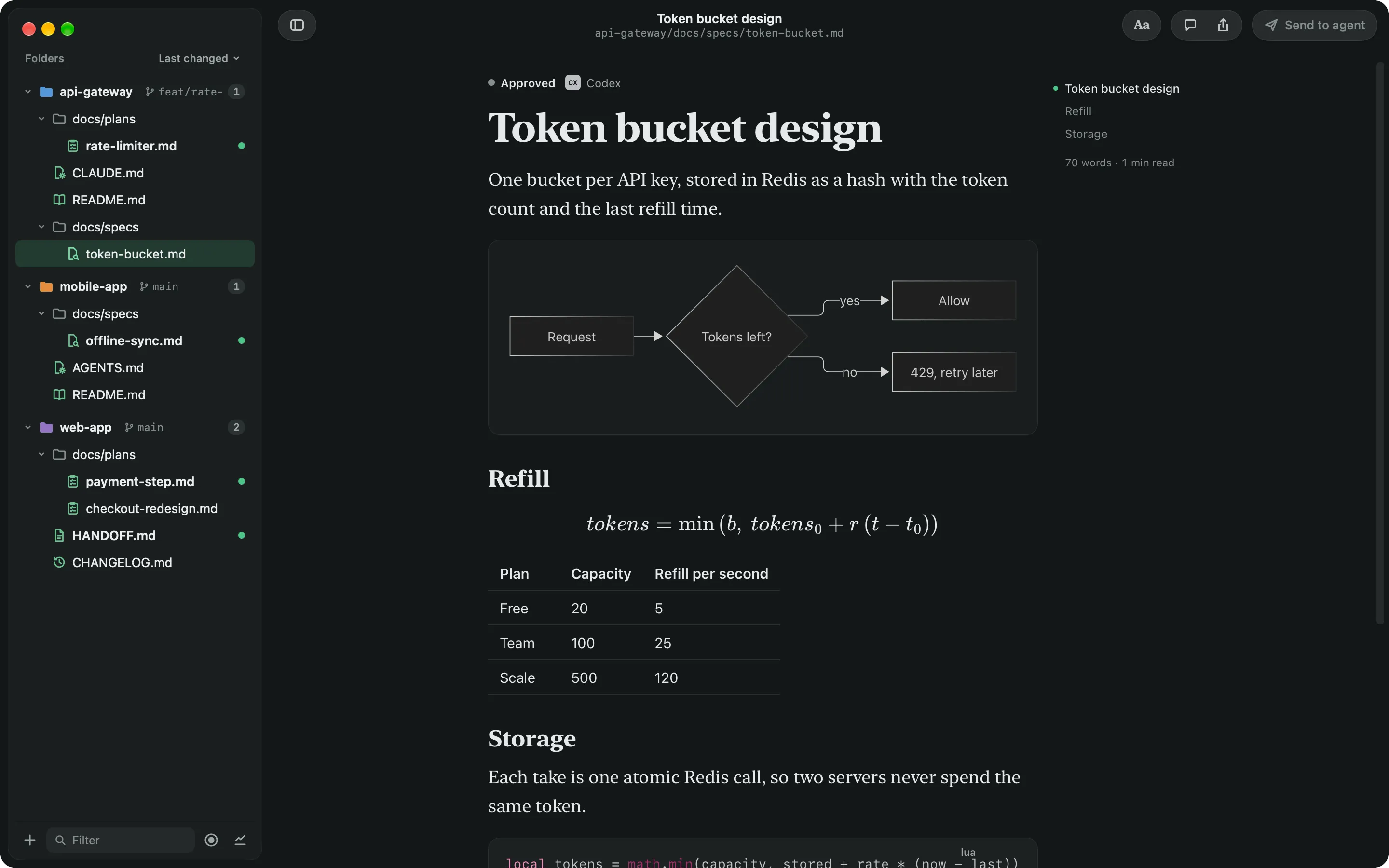
That’s the same flowchart from the code block above, in a design doc an agent wrote. Dark mode gets its own version of the diagram, so it isn’t a bright white box on a dark page.
Why I want diagrams rendered offline
dotPen bundles Mermaid inside the app, so it draws diagrams on your Mac with no internet connection and nothing sent anywhere.
That matters more than it sounds. The files agents write are often internal: architecture, database changes, customer flows. I don’t love pasting those into a web editor to see a picture. And I read a lot of plans on slow connections, where a renderer that needs the network just shows the code again.
It also means diagrams update live. When an agent is still writing a file, dotPen redraws the page as each section lands, diagrams included.
When a diagram won’t render
Agents write Mermaid well most of the time, but not always. One wrong character and the whole diagram fails.
In dotPen, a broken diagram doesn’t leave a blank gap. You get a card with Mermaid’s error message where the diagram should be, and a Show Source button that reveals the code behind it.
The errors I see most often:
- A missing or wrong arrow.
-->is an arrow.->is not, in a flowchart. - An unclosed bracket or quote.
A[Requestwith no closing]breaks everything after it. - Special characters in a label. Parentheses or quotes inside a box label need the whole label in double quotes:
A["Retry (later)"]. - A reserved word as a node name. A node called
endin lowercase can break a flowchart. Rename it or capitalize it. - A diagram type typo. The first line has to name a type Mermaid knows, like
flowchart,sequenceDiagramorstateDiagram-v2.
If I can’t spot it, I paste the block into the Mermaid Live Editor, fix it there, and then ask the agent to make the same fix in the file. Or I leave a comment on the broken line and send it back. That’s in how to give feedback on a Claude Code plan.
Sharing a diagram outside the file
Diagrams are awkward to share, because most places you’d paste them don’t speak Mermaid.
dotPen’s share menu has two copies that handle this. Copy for Google Docs pastes the whole page with each diagram as an image. Copy for Slack pastes the diagram’s Mermaid code, since Slack can’t show it any other way. I covered the rest of that in how to paste Markdown into Slack and Google Docs.
For a document you want to send as a file, export it. A PDF or HTML export from dotPen keeps the diagrams drawn. That’s in how to export Markdown to PDF on a Mac.
Which one I’d pick
If the file lives on GitHub and you’re reviewing a pull request, read it there. If you’re already writing in VS Code, its preview is good enough now.
For the plans and specs an agent leaves on your Mac, I’d use a viewer that opens instantly, works offline and shows the diagram as part of the page you’re reading. That’s the reason we built Mermaid into dotPen from the first version. You can see the rest of what dotPen renders on the features page.
Questions
- How do I view a Mermaid diagram in a Markdown file on a Mac?
- Open the file in an app that renders Mermaid. dotPen, VS Code's built-in Markdown preview and Obsidian all draw mermaid code blocks as diagrams, and GitHub renders them in Markdown files and pull requests.
- Can I view Mermaid diagrams offline?
- Yes, in an app that bundles Mermaid. dotPen draws diagrams on your Mac with no internet connection. Web tools like the Mermaid Live Editor need you to be online.
- Why does my Mermaid diagram show an error?
- Usually a syntax slip, like a missing arrow, an unclosed bracket or quote, or a word Mermaid treats as a keyword. dotPen shows the error with Mermaid's message, and Show Source lets you see the code behind it.
- Can I copy a Mermaid diagram into Google Docs?
- In dotPen, Copy for Google Docs pastes each diagram as an image, along with the rest of the formatted page.